Hello friends!
It is time for another fun use-case and solution that goes a bit further than what you may know with standard out-of-the-box Salesforce tools.
This is a use-case that I am positive you admins and devs run into ALL THE TIME :). If I had a dollar for every time an email alert was requested that needed to send to a related record’s email field or a non-standard email recipient based on some change to a child record, well I would still be writing blogs and working a Salesforce job, but I could probably take the wife out to a nice fancy dinner!
That’s right… email alerts. They are so powerful and used so heavily in Salesforce, but what if I want to merge fields from related records? What if I want to send an email to a recipient email address that isn’t stored on the record kicking things off and isn’t part of the standard suite of options?

These are limitations to the basic email alert system that just don’t serve every need, so I am going to show you some simple ways using process builder to get around some hurdles and then leave you thinking about even more advanced ways to fire emails with data from all kinds of sources using flows and apex.
The problem
The biggest issue I see often when it comes to automating emails or other changes, is the need to send an email to an email address on a related custom object record based on a data change to a record looking up to it. This cannot be done with standard email alert functionality, as we can see posted in the image above.
Let’s say you are using cases for internal task triage as well as customer experience portal uses. Implicit sharing in Salesforce suggests that “If a portal or site user is a contact on a case, then the user has Read and Write access on the case.”
However, you may not want to have a Contact associated to a case you are using for internal-only communication, because you may not want your portal users to see it… So your standard “Related Contact” email alert recipient option won’t help here. Let’s say that you also don’t want to store the email in a new field on the case, because that seems like a waste of a field and you would still need automation to fill it in on the case record.
You can’t use formula fields as email recipients either, so simply creating a formula field to grab an email from a related custom object record won’t help either. At this point the developer in me started scratching his head thinking of all the crazy things I could implement to send emails with whatever I wanted.
I could use an email message in an apex class that could query the intended recipient from the case that was created and set whatever related email I wanted. I could even create said apex class and then make it invokable then use a flow to invoke the apex class to send the email message with whatever recipient and template I wanted (stay tuned because this will certainly be another blog post in the future!). I could even use a flow to do the querying and send in the recipient, merge-field values, etc… as arguments from the flow into an invokable apex class. I could even create an entire email-messaging framework using an interface, a bunch of configuration tables, dynamic apex queries and completely abstract the email message attributes from the apex class into config tables to make everything completely dynamic by creating my query string for each use-case in the flow itself then I could have a dynamic email message service callable from both apex and flows… then I could use a platform event to…
Are you lost yet? What problem was I solving again? I may have started over-engineering a bit…

A true Salesforce architect will use as much of the platform’s tools as possible to fulfill a use-case before coding, so before I dove into apex any further, I broke this problem up. What am I really trying to solve and is there a simple way to do it with just the config? As a true pragmatic programmer, sometimes we must ask “is the time to build the perfect, abstract, framework for this use-case worth the pay-off it will provide?” If you have a tool that can solve the more specific use-case you have in minutes, probably not… if the problem keeps coming up with slight variants, perhaps it is.
After thinking a bit more about the limitations of email alerts, I realized that there were two problems with the standard email alert and email templates that I need to solve for often:
- Sending to a recipient that isn’t a static email or referenced directly on the record kicking off the email.
- Sending an email template that can pull merge fields from multiple related records.
For brevity-sake (and to save myself some content for the next one 🙂 ) I will just be addressing number 1 in this post…
The Solution
So let’s say you have a case type that will be for internal task triage, and you this case type is always created in relation to a custom object record. Your sales staff is trained to generate this case type when it is time for your legal team to do something with that related record’s information. You don’t want the case to include a contact because you don’t want your portal users to see these legal-team cases. However, there is a related contact look-up on the custom object record that this case was created out of, and you do want that related contact to receive a specific email every time these internal cases are kicked off…
How can you send an email alert to a related record’s related contact’s email? Well… the short answer for most admins would be you can’t. There is no way to set up an email alert to simply “dot” into an email address of a related record, you must use the standard, and very limited suite of related record options or an email field directly on the record that is starting the alert.
Now, a good architect also knows you shouldn’t just create a field for an email address on a case, if you have that email address stored on a related parent record up the chain. It is de-normalizing to your database and just a waste of a field. It wouldn’t even get you away from using automation outside of the standard email alert to solve your problem, because you would need to create automation to fill in the email field with the proper email…
Let’s be real, if you are going to use automation to grab the email address you want to send to and then rather than just using it at that same moment store it in a duplicate field on a different record… stop and look at yourself…
So what do we do? How can we initiate an email alert on a related record from a child one? This is a fun one I like to call “Invokable Chaining.” It sounds super complicated, but don’t worry, in a matter of minutes you will see how simple this is.
So first we will need a custom object and some relationships established. For simplicity’s sake, I will show this in a data schema I created with some random objects here:
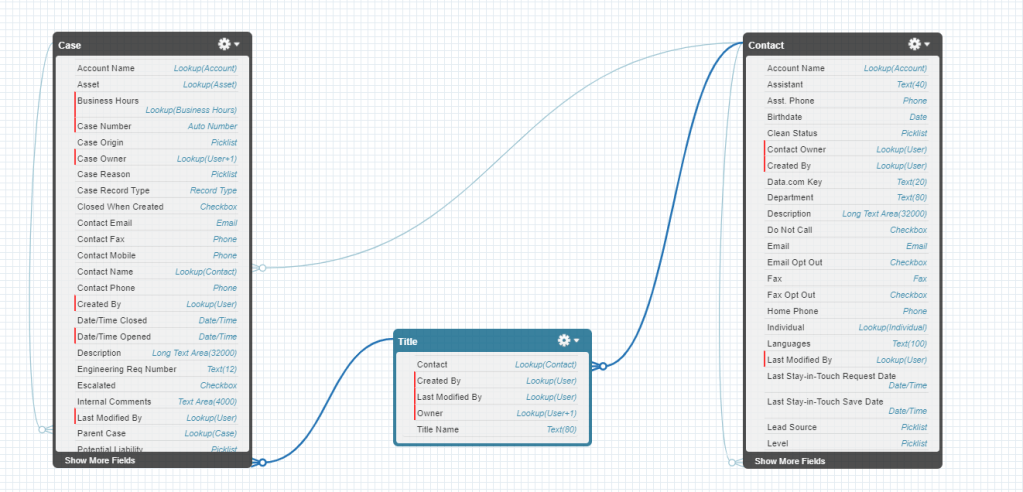
Note that there is a direct lookup to Contact from Case, but remember, we DO NOT want that contact related to these cases, because we don’t want them implicitly shared to that contact if they are a community member… So we need to send an email alert to the contact that is looked up on the Title that is looked up on the case, every time a case of a certain type is created from a button on the Title object.
In order to do this you will want to create an email template for use, and a Contact object email alert that sends to that contact.
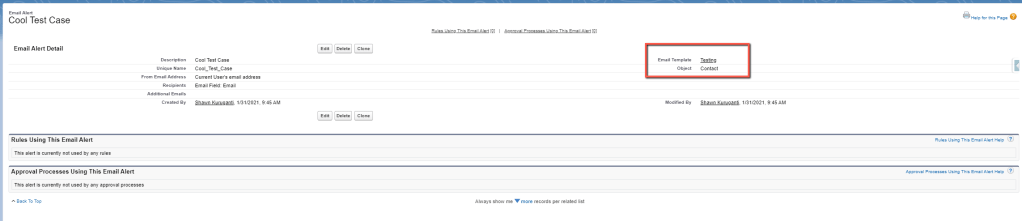
By now you may be thinking… “But Shawn, aren’t we sending an email alert based on a case being generated? Why is your email alert on the Contact object?! Aren’t you supposed to be some kind of smart guy? Don’t you know anything!?”
While I frequently question my own knowledge, in this case it isn’t ignorance, you will need the email alert to be on the contact because that is the only way to grab the contact’s email and set it to be the recipient without creating that duplicate field we discussed.
Now the fun part… how do kick off this contact email alert from a case creation?
Well, we need to simply chain some process builders… First create a contact process builder that is invoked by another process builder like this:
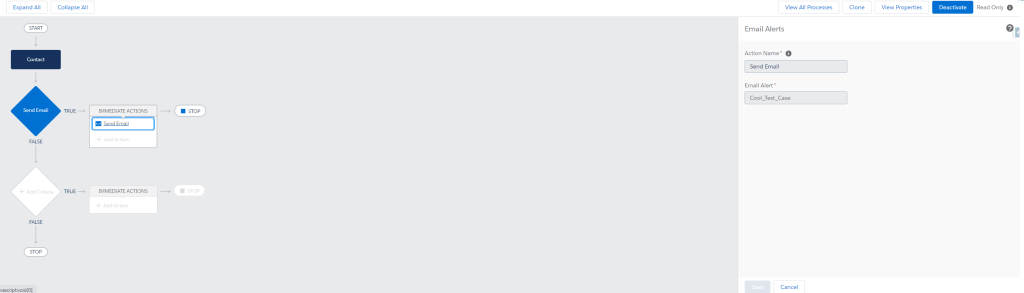
So simple… all it does is send the email alert. “Ok, but how do I go from case creation to this one? There isn’t a contact related to these cases Shawn!?”
I’m glad you asked… now we will activate this process builder and create another invokable process builder on the Title custom object, which relates to contact…
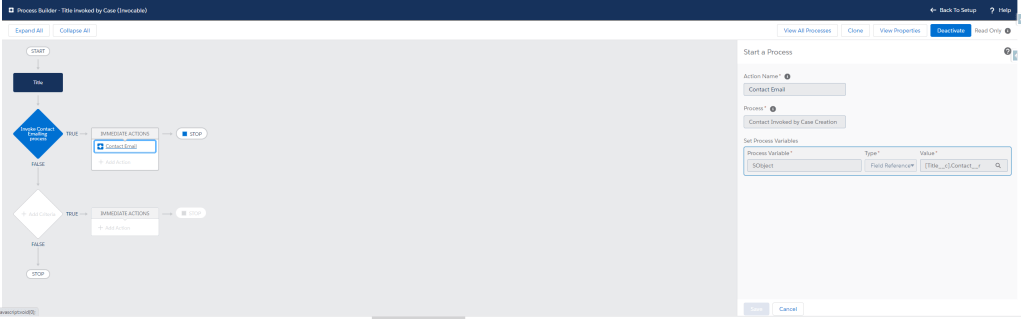
This process builder will simply invoke the contact process builder which will send the email. It is important to note that this assumes at the point of creating the special internal cases that there is always a related contact on the related title… this won’t work if the title doesn’t have a contact to send into the contact process builder.
Activate this process builder and now we move to the final step… creating a case process builder to listen for the data change that we want to email the related contact on.
It should look something like this:
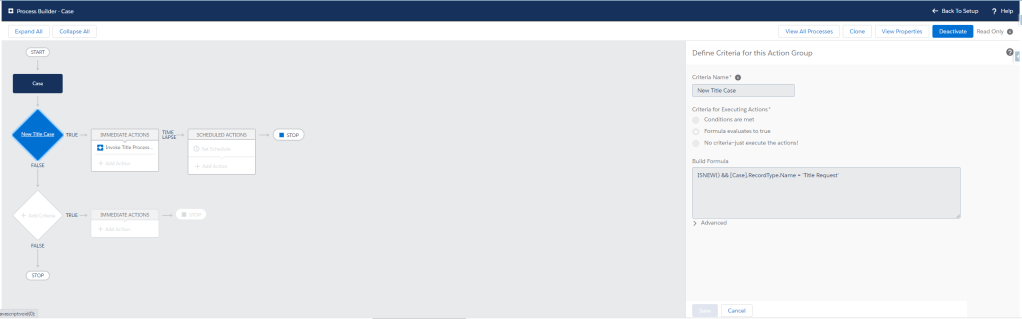
Note that in my case I am checking only that the case ISNEW() and it is of the type “Title Request.” Make sure your process-builder criteria is always hyper-specific and will only kick off when the intended changes are made to the record.
For example, let’s say every time a field called “color” changes to “blue” you want your process to kick off. If your criteria is simply set to “color__c = ‘blue’ ” you may end up kicking the process off if a user changes an unrelated field on a record where color already equals “blue.” To ensure that your process actions only trigger when the record is changed to meet the criteria you can click the “Advanced” checkbox. This will avoid situations like an email sending again after an unrelated change is made to the record.
That’s basically it. Go ahead and activate this one, create a contact with your email address, create a custom object record that looks up to that contact, then create a case that meets the criteria to send that contact an email and add the custom object record to that cases lookup field you are using to set in the invokable process builder and voila!

You successfully sent an email to a related record’s email address without mucking up your data architecture with unwanted duplicate-data fields, or unnecessary automation just to fill said junk email fields in. And look at you, you did it without a single line of code!
Stay tuned, because the next installment will show you how to not only choose a related recipient, but how to merge fields from the case, the title and the contact all into one email template!
What email struggles do you have in Salesforce and how do you solve them?
Let me know in the comments section.
As always: May the Salesforce be with you!
Shawn
 Salesforce Shawn